
Apply Online National Job Portal (NJP) | Today Govt Jobs in Pakistan: The National Job Portal (NJP) is the official website of the Government of Pakistan for applying to federal government jobs online. Whether you are a fresh candidate or an experienced professional, your complete application — registration, profile and submission — is done on this one portal: njp.gov.pk. Follow this step by step guide carefully; a screenshot is given with every step so you can match your screen while applying.
Apply Online National Job Portal (NJP) | Today Govt Jobs in Pakistan
- Portal Name: National Job Portal (NJP)
- Official Website: www.njp.gov.pk
- Managed By: National Information Technology Board (NITB), Government of Pakistan
- Registration & Apply Fee: Completely free
- Apply Mode: Online only
- Helpline: 051-9265411, 051-9265062
- Email: info@njp.gov.pk
Things Required Before NJP Applying
- Original CNIC number
- Active mobile number and email address
- Educational certificates (Matric to last degree)
- Domicile and PRC (if required)
- Recent passport-size photograph (soft copy)
- CNIC front and back images (soft copy)
- Experience certificates (if applicable)
- Updated CV
Step 1 – Create Your Account (Sign Up)
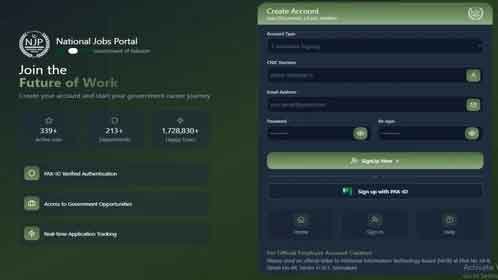
- Open www.njp.gov.pk and click Sign Up
- Select Account Type: Candidate Signup
- Enter your CNIC Number and Email Address
- Create a password and re-type it
- Click SignUp Now (or choose Sign up with PAK-ID)
- Verify your account with the code sent to your mobile/email
Step 2 – Sign In to Your Account
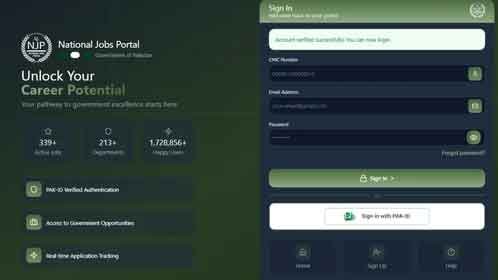
- Open the Sign In page
- Enter your CNIC Number, Email Address and Password
- Click Sign In
- After verification, the message “Account verified successfully! You can now login” appears
- Use Forgot password? if you ever forget your password
Step 3 – Fill Personal Details (Profile Section 1 of 8)
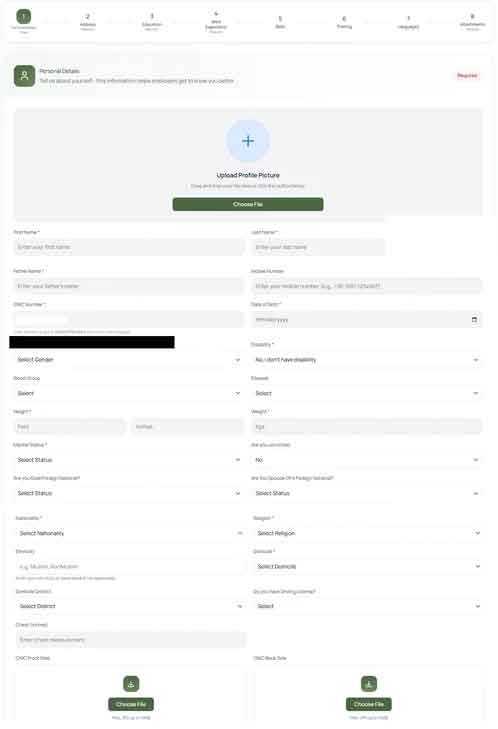
NJP builds your CV in 8 sections. The first and most important is Personal Details:
- Upload your profile picture
- Enter First Name, Last Name and Father Name
- Enter Mobile Number, CNIC Number and Date of Birth
- Select Gender, Blood Group, Height, Weight and Marital Status
- Select Nationality, Religion, Domicile and Domicile District
- Upload CNIC Front Side and Back Side (PNG/JPG, up to 10MB)
- Click Next
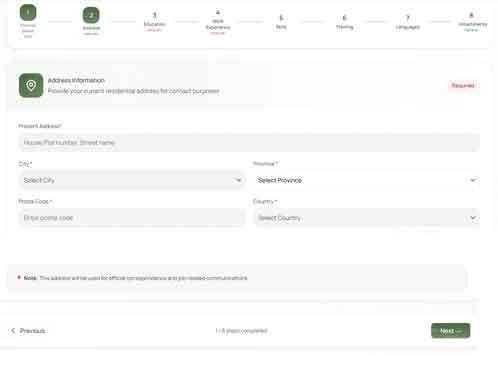
Step 4 – Add Address Information (Section 2 of 8)
- Enter your Present Address (house/flat number, street name)
- Select City and Province
- Enter Postal Code and select Country
- This address is used for official correspondence and job letters, so write it exactly and carefully
- Click Next — after this come Education (Section 3) and Work Experience (Section 4), where you add your degrees and job history
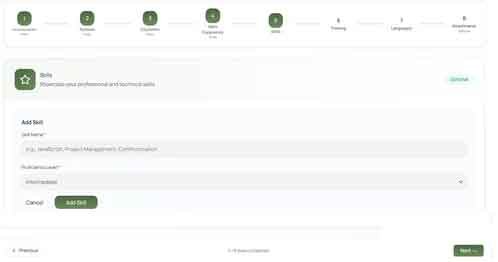
Step 5 – Add Your Skills (Section 5 of 8)
- Type your Skill Name (e.g. Computer, Communication, Typing, Project Management)
- Select the Proficiency Level — Beginner, Intermediate or Expert
- Click Add Skill (you can add as many skills as you have)
- After this, Training (Section 6) and Languages (Section 7) are completed the same way
- Click Next
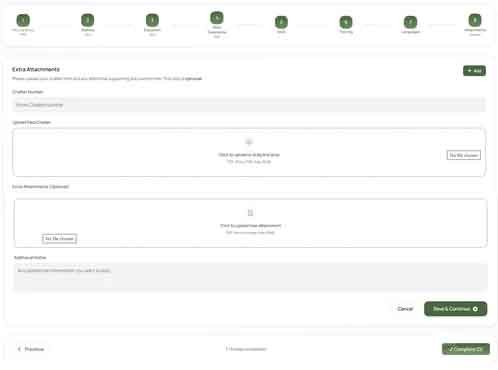
Step 6 – Upload Attachments and Challan (Section 8 of 8)
- Enter the Challan Number if the advertisement requires a fee challan
- Upload the Paid Challan copy (PDF, JPG or PNG, max 5MB)
- Upload extra documents in Extra Attachments (optional)
- Write additional notes if needed
- Click Complete CV
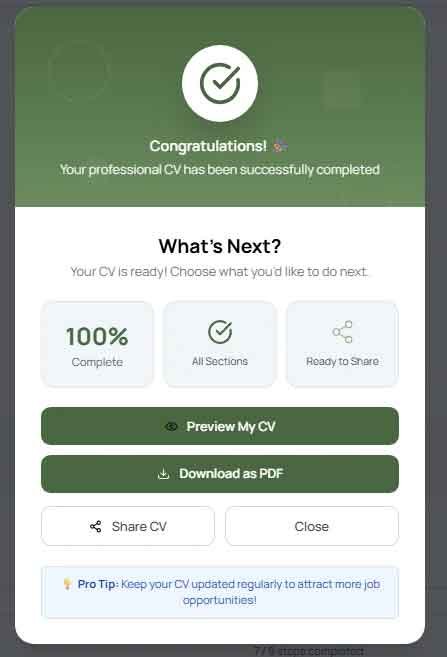
Step 7 – Your CV Is 100% Complete
- A “Congratulations!” screen confirms your professional CV is successfully completed
- All sections show complete and Ready to Share
- Use Preview My CV to re-check everything once
- You can also Download as PDF and keep a copy
- Remember, you cannot apply properly with an incomplete profile, so complete this step first
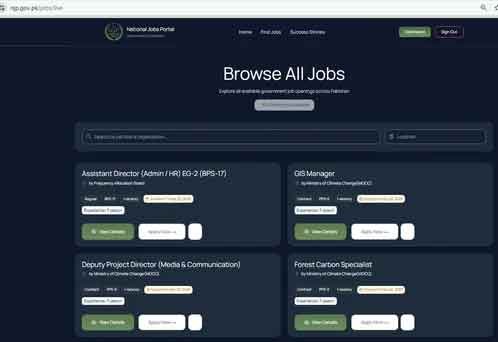
Step 8 – Browse Jobs And Apply Now
- Click Find Jobs to open the Browse All Jobs page
- Search by job title, organization or location
- Every job card shows post name, department, type (Regular/Contract), grade (BPS/PPS), vacancies, experience and last date
- Click View Details and read the full advertisement
- Check that your education, age, domicile and experience match the eligibility criteria
- Click Apply Now, re-check your information and press Submit
- Save the confirmation, and track your application anytime from your Dashboard
- Apply only on the official website www.njp.gov.pk — beware of fake look-alike websites
- Registration and applying are 100% free; anyone demanding money for a government job is a fraud
- Never share your password or OTP with any person or agent
- Always apply before the last date; late applications are not accepted
- NJP is for federal jobs — for provincial jobs, use the portal named in that advertisement (PPSC, SPSC, KPPSC, BPSC, etc.)
FAQs
How do I apply online on the National Job Portal?
Register on njp.gov.pk, complete your profile in 8 sections, open Find Jobs, select your post and click Apply Now.
Is NJP registration free?
Yes, registration, profile creation and applying are completely free.
Can fresh candidates apply?
Yes, fresh candidates can apply for every post where experience is not required.
How can I check my application status?
Log in to your account and open the Dashboard — all your submitted applications are listed there.
NJP Online Apply Process
The complete NJP process is: Sign Up → Sign In → Personal Details → Address → Education & Experience → Skills → Attachments → CV Complete → Apply Now. Complete your profile once by following these steps with the screenshots, and after that you can apply for any federal government job online within minutes — no agent, no fee and no office visit.
Today New Govt Jobs in Pakistan
Today’s Govt Jobs (10 Nov 2026): ASF Balochistan 69 vacancies — last date tomorrow, 11 Nov via NJP. Also open: PECTAA 105 posts, FPSC 278 posts, CDA, PAF, NADRA and Bank of Punjab — apply online before the last date.





2 thoughts on “Apply Online National Job Portal (NJP) | Today Govt Jobs in Pakistan”