

Rs 10000 Apply Online 2026 – Maryam Ko Batain Registration Step By Step: The Punjab Government’s Maryam Ko Batain (MKB) program gives Rs 10,000 financial assistance to deserving families, and the complete application process is online at mkb.punjab.gov.pk. No office visit, no agent, no fee — you register on the portal, submit your request, and collect the payment in your own digital wallet. Here is the complete process, step by step, with screenshots of every screen.
Rs 10000 Apply Online 2026 – Maryam Ko Batain Registration Step By Step
The complete Maryam Ko Batain application takes only a few minutes: Sign Up on mkb.punjab.gov.pk, log in, select Maryam Ko Batayn from New Request, fill the form, pick your digital wallet and submit. Keep your Submission ID safe, check your status on the dashboard or via 8070, and your Rs 10,000 will reach the wallet you selected once your request is approved.
10,000 Apply Online 2026 Registration Guide
| Detail | Information |
|---|---|
| Program | Maryam Ko Batain (MKB) |
| Official Portal | mkb.punjab.gov.pk |
| Assistance Amount | Rs 10,000 |
| MKB Apply Online | Click Here For Maryam Ko Batain Registration |
| Ways to Apply | Web Portal, Mobile App, Helpline 1000 |
| Payment Wallet | JazzCash / Easypaisa / Bank Account (chosen in the form) |
| Status Check | Portal dashboard / SMS CNIC to 8070 / Helpline 1000 |
Before You 10000 Apply Online – Keep These Ready
- Your original CNIC (13-digit number)
- A mobile SIM registered in your own name (the OTP is sent to this number)
- Your JazzCash / Easypaisa account or bank account details for payment
- Family details and your monthly household income
Maryam Ko Batayn Registration Online Apply – Step By Step
Here is below the complete step guide Maryam Ko Batayn;
Step 1: Open the Portal And Sign Up
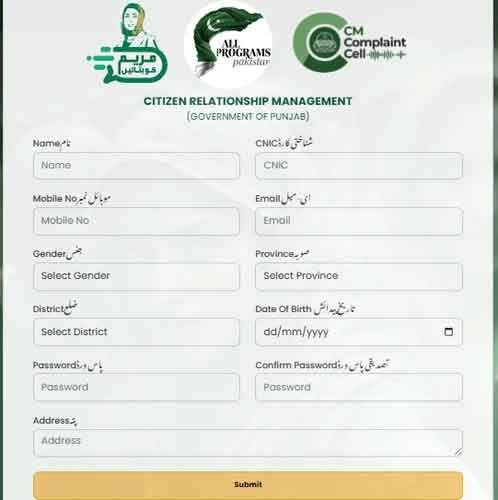
Go to mkb.punjab.gov.pk and open the registration form. Fill in your Name, CNIC, Mobile Number, Email, Gender, Province, District, Date of Birth and Address, create a Password, and press Submit.
Step 2: Registration Successful
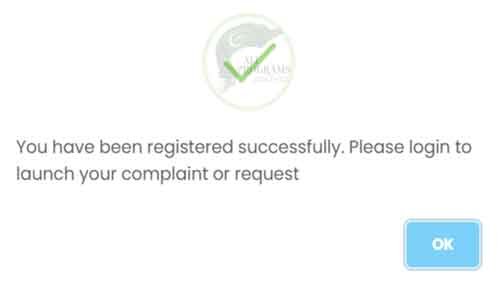
On correct submission, the screen shows “Successfully Registered!” — your account is created and you can now log in.
Step 3: Login To Your Account
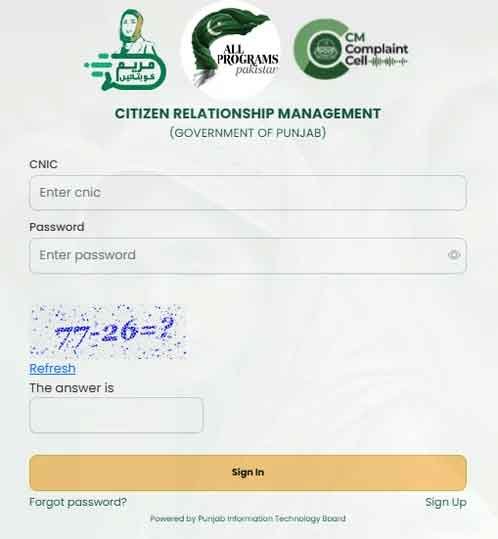
On the login screen, enter your CNIC and Password, solve the small maths captcha (for example 77 − 26 = ?), and click Sign In. If you forget the password, use the Forgot Password link on the same screen.
Step 4: Your Dashboard Opens
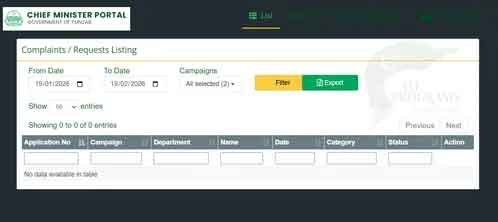
After login, your Chief Minister Portal dashboard opens. All your complaints and requests are listed here — this is also where you will later check your application status.
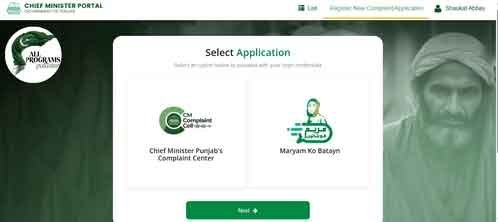
Step 5: Select The Maryam Ko Batayn Application
Click New Request. On the Select Application screen you will see the CM Complaint Center and Maryam Ko Batayn — click Apply Now on Maryam Ko Batayn.
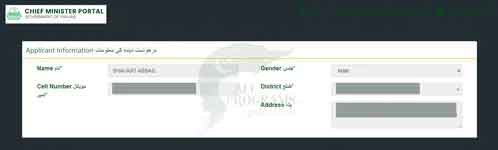
Step 6: The Application Form Opens
The New Request / Application Form opens with your basic applicant information at the top. Check that your name and details are correct before moving ahead.
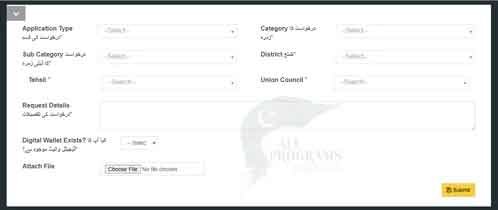
Step 7: Fill The Form Details And choose Your Wallet
Complete the remaining fields — Gender, Province, District, Tehsil — then select your Digital Wallet for payment (JazzCash, Easypaisa or Bank Account), write the Subject and a short Description of your request, and submit the form. Choose the wallet carefully: your Rs 10,000 will be sent to this account.
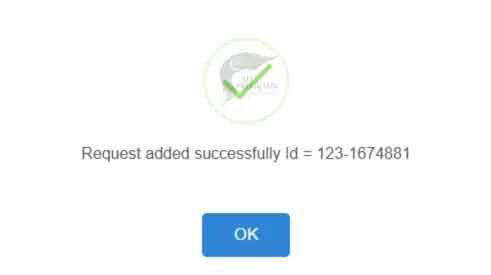
Step 8: Request Submitted
On successful submission, the confirmation screen appears: “Your Request has been submitted!” with your Submission ID. Save this ID — it is your proof and your reference for every follow-up.
Apply Through The MKB Mobile App
You can complete the same process on the Maryam Ko Batain app (official PITB app on the Play Store, Android only): Sign Up with the same details, verify, log in, and submit the request from the app dashboard. The helpline 1000 (toll-free) can also guide you through the application.
What Happens After MKB 10000 Applying?
- Your request is verified against PSER and NADRA records
- Its status on your dashboard moves from Pending → Under Verification → Approved / Rejected — you can also check by sending your CNIC to 8070 by SMS (the full status guide is in our separate post)
- According to reports, families already registered in PSER usually get a response in about 24 hours; new applicants in about 4 days
- On approval, the Rs 10,000 is sent to the digital wallet you selected in the form; approved applicants are also receiving a JazzCash SMS with a PIN code, and the amount must be collected within 15 days (full login and payment details are in our portal post)
If your request stays on Under Verification for many days, do not submit a second application — duplicates slow the process. Call the helpline 1000.
Who Can Apply 1000 Help Line?
- A resident of Punjab with a valid CNIC
- A low-income household — final eligibility is decided after PSER/NADRA verification
- Only one application per household
- Submitting an application does not guarantee payment — approval comes after verification
Beware of Fraud
- mkb.punjab.gov.pk is the only official portal — never enter your CNIC on look-alike websites
- Registration and payment are completely free — never pay an agent
- Never share your OTP or PIN with anyone; no official will ever call to ask for it
- Do not post your mobile number publicly in Facebook comments
FAQs
How do I apply for the Maryam Ko Batain Rs 10,000?
Sign up at mkb.punjab.gov.pk, log in, open New Request, select Maryam Ko Batayn, fill the form, choose your digital wallet and submit — you will get a Submission ID.
Which wallet should I select in the form?
Whichever you actively use — JazzCash, Easypaisa or a bank account. The payment is sent to the wallet selected in the form, so double-check the account number.
Is there any fee for applying?
No. Registration, application and payment are completely free.
I forgot my password. What should I do?
Use the Forgot Password link on the login screen, or call the helpline 1000.
How many applications can one household submit?
Only one. Duplicate applications create problems in verification and delay the payment.




1 thought on “Rs 10000 Apply Online 2026 – Maryam Ko Batain Registration Step By Step”